Programmable CAD for VS Code

Design CAD models with code.

Write JSCAD in VS Code, preview the result in real time, and export manufacturing-ready files from one workflow.

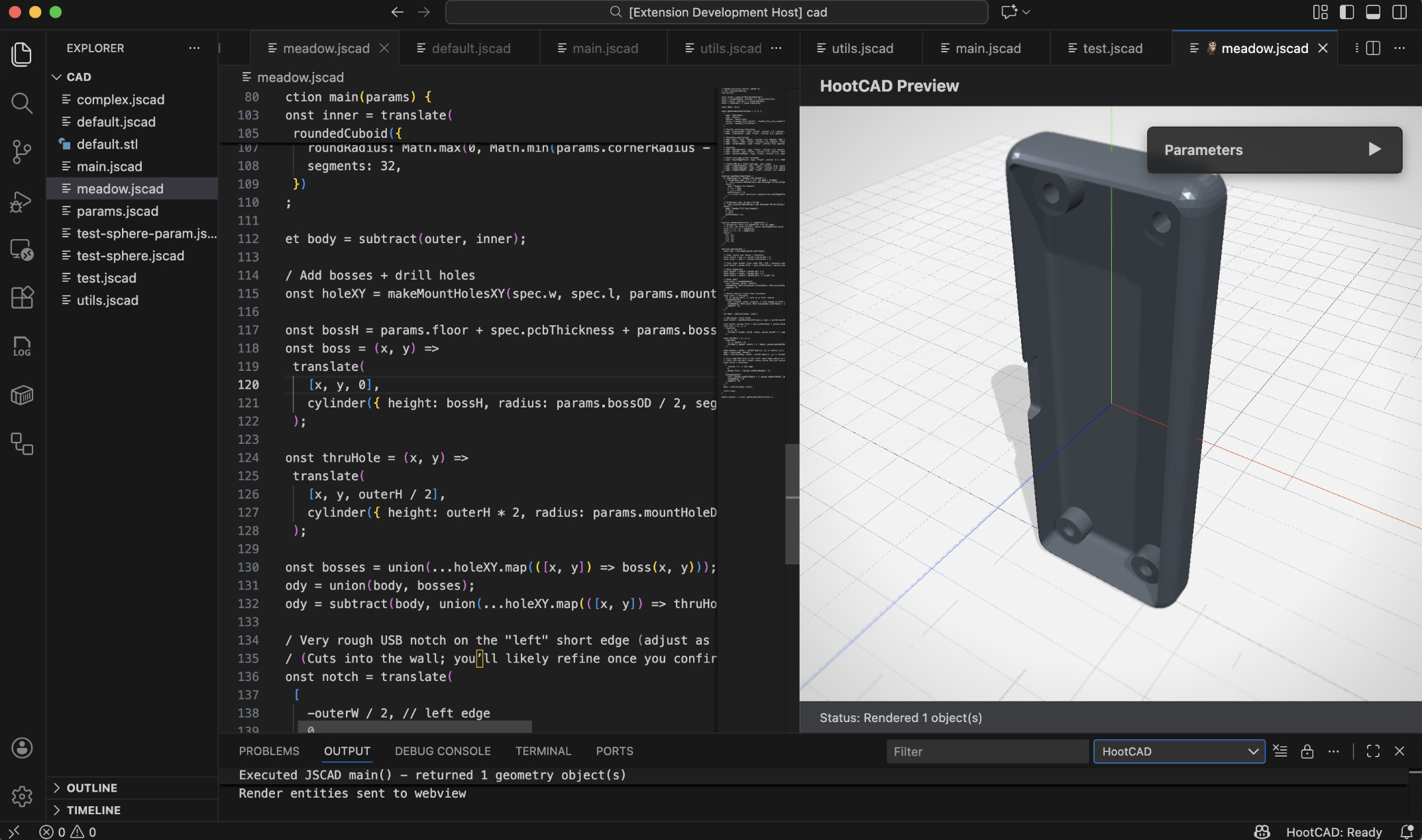
HootCAD running in VS Code with code editing and a live 3D CAD preview

See the code, the parameters, and the live 3D preview together.

What You Can Do Today

Everything you need to go from idea to export

HootCAD keeps coding, visualization, and manufacturing output in one tight loop.

Parametric design with JavaScript

Build reusable parts, configurable dimensions, and generated geometry with JSCAD.

Live 3D preview

Inspect the model as you code so mistakes surface early instead of after export.

Production-ready exports

Ship STL, OBJ, DXF, SVG, AMF, and more without bouncing between tools.

Agent-friendly workflows

Use AI coding agents safely through MCP when you want help with geometry and math.

Simple Workflow

A fast loop from code to finished file

1

Write your model

Create or update a .jscad file in VS Code.

2

Open the preview

Launch HootCAD to render your geometry beside the code.

3

Inspect the result

Rotate, zoom, and validate the shape before you commit to export.

4

Export and ship

Generate the format you need for fabrication, sharing, or downstream tooling.

Built for Modern Development Workflows

Fits the way engineering teams already work

HootCAD treats CAD like source code, so it slides into the tooling and habits your team already trusts.

  • Text-based design files
  • Meaningful Git diffs
  • Code review friendly
  • Built for VS Code
  • Open source (MIT licensed)

Why that matters

Reviewable changes See geometry edits in pull requests instead of passing opaque binary files around.
Reusable building blocks Turn dimensions, constraints, and repeated features into maintainable code.
One familiar editor Keep the CAD workflow inside VS Code instead of fragmenting your toolchain.

Optional AI Assistance

Bring agents into the loop without giving up control

HootCAD includes a secure MCP server for coding agents, so you can get help with the tricky parts of programmable CAD while keeping the workflow inside your editor.

CAD guidance for JSCAD

Get help shaping geometry, organizing scripts, and translating design intent into code.

Safe dimensional math

Use agents for calculations and parameter work without handing over the full environment.

Ready to try it?

Turn VS Code into your CAD workspace

Install HootCAD, start modeling with code, and export production-ready files from the same environment where you already build software.